Google Script
- https://script.google.com/home
- Menu > Tools > Script editor
Image Source

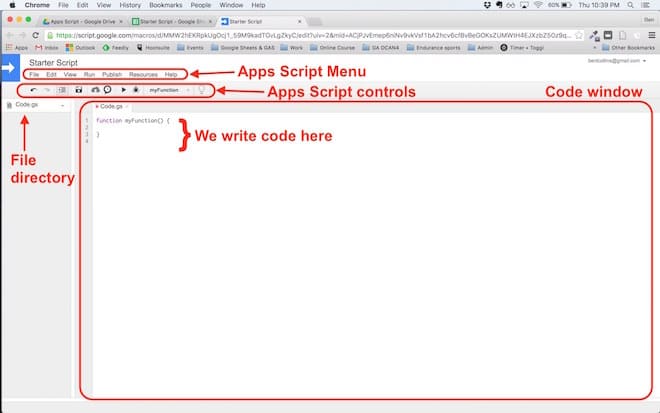
- By default, it’ll open with a single Google Script file (code.gs) and a default code block, myFunction():
function myFunction() {

}
Hello World popup box Example
- Hello World Example: https://www.benlcollins.com/spreadsheets/starting-gas/
Code
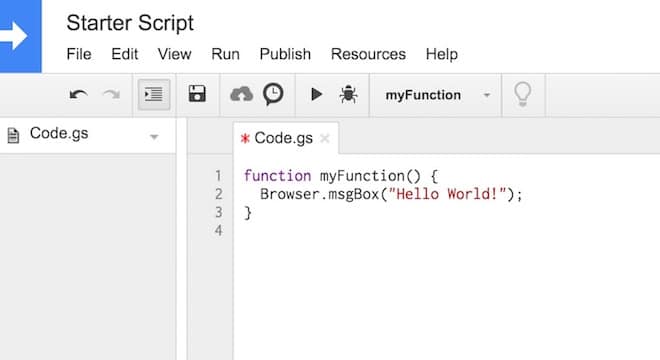
function myFunction() {
  Browser.msgBox("Hello World!");
}
Result

Image Source
Get All your Gmail Labels
This below script list out all your labled from gmail.
var labels = GmailApp.getUserLabels();
for (var i = 0; i < labels.length; i++) {
  Logger.log("label: " + labels[i].getName());
}
Folders files total count
The below code write the total count in “Photos” sheet
function onOpen() {
  var ss = SpreadsheetApp.getActiveSpreadsheet();
  var menuEntries = [
    {name: "Count", functionName: "countPhotos"}
  ];
  ss.addMenu("Photos", menuEntries);
}

function countPhotos() {
  var folders = DriveApp.getFoldersByName("ArunEworld");
  if (!folders.hasNext()) throw "ArunEworld Folder not available in Good Drive";
  var folder = folders.next();
  var photos = getContents(folder);
  var ss = SpreadsheetApp.getActiveSpreadsheet();
  var sheet = ss.getSheetByName("Photos");
  sheet.appendRow([new Date(), photos])
}

function getContents(folder) {
  var photos = 0;
  var files = folder.getFiles();
  while (files.hasNext()) {
    var file = files.next();
    photos++;
  }
  var subfolders = folder.getFolders();
  while (subfolders.hasNext()) {
    var subfolder = subfolders.next();
    photos += getContents(subfolder);
  }
  return photos;
}
Function Breakdown
a) onOpen()
function onOpen() {
  var ss = SpreadsheetApp.getActiveSpreadsheet();
  var menuEntries = [
    {name: "Count", functionName: "countPhotos"}
  ];
  ss.addMenu("Photos", menuEntries);
}
Purpose:
- Runs automatically every time the spreadsheet is opened.
- Creates a custom menu called
"Photos"in Google Sheets. - Adds a menu item
"Count"that triggers thecountPhotos()function when clicked.
How it works:
SpreadsheetApp.getActiveSpreadsheet()→ Gets the currently opened spreadsheet.addMenu("Photos", menuEntries)→ Adds a menu called “Photos” with one action “Count”.
b) countPhotos()
function countPhotos() {
  var folders = DriveApp.getFoldersByName("ArunEworld");
  if (!folders.hasNext()) throw "ArunEworld Folder not available in Google Drive";
  var folder = folders.next();
  var photos = getContents(folder);
  var ss = SpreadsheetApp.getActiveSpreadsheet();
  var sheet = ss.getSheetByName("Photos");
  sheet.appendRow([new Date(), photos])
}
Purpose:
- Finds the folder named
"ArunEworld"in Google Drive. - Counts all files (including in subfolders) using
getContents(). - Logs the timestamp and file count in the
"Photos"sheet.
Key Points:
DriveApp.getFoldersByName("ArunEworld")→ Returns a folder iterator.if (!folders.hasNext())→ Checks if the folder exists; throws an error if not.sheet.appendRow([new Date(), photos])→ Adds a new row with current date and photo count.
c) getContents(folder)
function getContents(folder) {
  var photos = 0;
  var files = folder.getFiles();
  while (files.hasNext()) {
    var file = files.next();
    photos++;
  }
  var subfolders = folder.getFolders();
  while (subfolders.hasNext()) {
    var subfolder = subfolders.next();
    photos += getContents(subfolder);
  }
  return photos;
}
Purpose:
- Counts all files in the given folder.
- Recursively counts files in subfolders.
How it works:
folder.getFiles()→ Iterator for files in the folder.- Loops through each file → increments
photos. folder.getFolders()→ Iterator for subfolders.- Recursively calls
getContents(subfolder)to include files in subfolders. - Returns total count.
Example Use Case
- You have a folder
"ArunEworld"in Google Drive with images and subfolders. - Open the Google Sheet → Go to Photos → Count.
- The script counts all files and appends a new row like:
| Timestamp | File Count |
|---|---|
| 2025-09-28 10:15:00 | 120 |
- Each time you run, it logs the current count with a timestamp.