
Microsoft Excel Functions
Concatenate
- CANCATINATE() – Concatenate string
- Eg : if A2 contains Arun, B2 Contains Prakash, C2 Contains Maruthanayagam then A1=CONATINATE(A2,B2,C3) Result is “Arun Prakash Maruthanayagam
- Date & Time : =concatenate(text(A2,”mm/dd/yyyy”)&” “&text(B2,”hh:mm:ss”)) Concatenate Three cell into one cell.
HYPERLINK
If you have the following question like
- how to insert or add a hyperlink in excel cell?
Here your Answere
- Methode-1: Add URL link directly in cell. Example “https://aruneworld.com“

- Method-2: Add URL Link using Dialog Box, Shortcut key CNTL+ K and add your URL.
- Methode-3: Use HYPERLINK Function for web URL. For example
=HYPERLINK("https://aruneworld.com","ArunEworld") - Methode-4: Use HYPERLINK Function for windows Local folder linkage. For example your local folder is in this location C:\Users\ArunEworld\Microsoft\Excel\Function\Hyperlink then formula is
=HYPERLINK("C:\Users\ArunEworld\Microsoft\Excel\Function\Hyperlink","ArunEworld Hyperlink Folder Link")
Others Functions
- UNIQUE function Currently the unique function is only available with Office 365 subscription
- COUNTIF() – If you want to count the duplicates in the whole Column, use this formula =COUNTIF(A:A, A2)
- Example : =COUNTIF(A:A, A2)
Shortcut
- The new line of text inside a cell: To start a new line of text or add spacing between lines or paragraphs of text in a worksheet cell, press Alt+Enter to insert a line break.
- Add New Line with date inside cell – “Alt+Enter” for New Line, “Cnt+Colon” for date, “Shift+Cnt+Colon” – for timestamp.
Table of List
- How To Generate A List Of Sheet Names From A Workbook Without VBA : https://www.howtoexcel.org/tips-and-tricks/how-to-generate-a-list-of-sheet-names-from-a-workbook-without-vba/
Microsoft excel examples
How to Calculate the difference between two times i Excel?
- Make sure your two time cells in duration format.
- Consider your time duration will be in A1 and B1 then formula in C1 is
=IF(ISBLANK(A1),0,IF(ISBLANK(B1),(NOW()-A1),(B1-A1)))
| ArunEworld Sheet | A | B | C | D |
|---|---|---|---|---|
| 1 | 10:10:11 | 12:10:01 | 1:59:50 | Result |
| 2 | =IF(ISBLANK(A1),0,IF(ISBLANK(B1),(NOW()-A1),(B1-A1))) | Formula |
- Here this formula will check the cell is blank or not based on the cell filled values it will calculate.
How to Combine Date And Time Columns Into One Column in Excel?
- Make sure your date and time cells are in proper format.
- Consider your date will be in A1 and time will be in B1 then formula in C1 is
=CONCATENATE(TEXT(A2,"YYYY-MM-DD")&" "&TEXT(B2,"HH:MM:SS"))
| ArunEworld Sheet | A | B | C | D |
|---|---|---|---|---|
| 1 | 2000-01-01 | 12:10:01 | 2000-01-01 12:10:01 | Result |
| 2 | =CONCATENATE(TEXT(A2,”YYYY-MM-DD”)&” “&TEXT(B2,”HH:MM:SS”)) | Formula |
- Here this formula will check the cell is blank or not based on the cell filled values it will calculate.
Excel Feature: Table
- You can create, your data as table format. for that Shortcut is CNTL+T.
Why need to use your data as table format?
- Automatically update the formula for entire selected table columns.
- if your add formula in first cell then all the columns will automatically update[Without Refresh]
- This feature will be useful when create pivot table, Because automatically data will be updated
- But In order to use this feature pivot table should be refresh manually.
Excel Feature: How to view two or more Excel sheets side by side?

- Go to View Section in Menu
- Click New Window in Window Section
- Select the sheet, which you wanna view the new window.
Excel Feature: Others
- Pivot Table: how to edit the pivot table in excel? Click the pivot table area and right-click for Option, change Pivot table then edit.
- Compatibility mode: What is the compatibility mode in Microsoft office (excel, Word)?
- How To Apply Multiple Data Validation In One Cell In Excel Worksheet?: https://www.extendoffice.com/documents/excel/4933-excel-multiple-data-validation-in-one-cell.html
- VBA Code to Unlock a Locked Excel Sheet: http://www.instructables.com/id/VBA-Code-To-Unlock-A-Locked-Excel-Sheet/
- How to Convert XML to Excel?: Convert XML to Excel is very easy. The below steps for windows Machine.
- Open Microsoft Excel.
- Open XML file in Excel.
- Save as Excel in excel format.
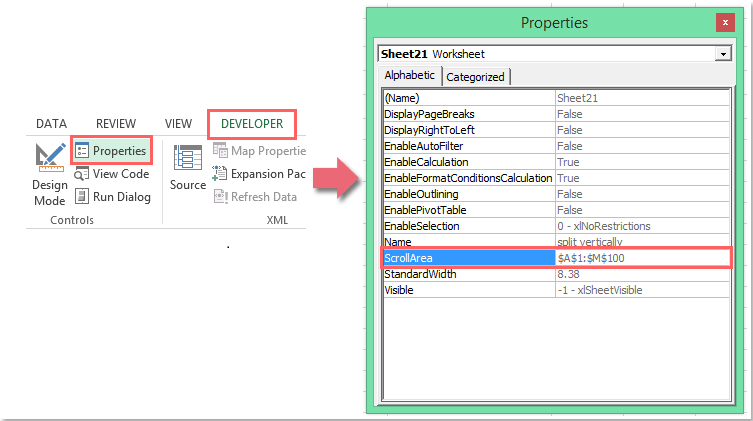
- lock screen to prevent scrolling in Excel worksheet
- Then click Developer > Properties, in the Properties dialog box, enter the range address (A1:M100) you need into the Scroll Area text box, see screenshot:
- https://d2d42mpnbqmzj3.cloudfront.net/images/stories/doc-excel/lock-screen-prevent-scrolling/doc-lock-scrollbar-1.png
VBA Macro
- ‘Copy range to clipboard :
Workbooks("New Data.xlsx").Worksheets("Export").Range("A2:D9").Copy - PasteSpecial to paste values, formulas, formats, etc.:
Workbooks("Reports.xlsm").Worksheets("Data").Range("A2").PasteSpecial Paste:=xlPasteValues
Issue: Microsoft Excel Cant Insert New Cells

- Reason: Some other cell may containing the unwanted formula or formatting or data.
- Solution:
- We need to remove all unwanted formula or formatting or data from other row or Colum.
- Select the unwanted row or Colum cells and
click clear allfromHome -> Editing Section(Refer the below screenshot)

- Try after the above steps you can able to insert the row or Colum in sheet.

You must be logged in to post a comment.